


Metadata in Water Data for the Nation
Metadata are crucial to interpreting and understanding USGS water data. With the modernization of WDFN, we are changing the way you access and explore USGS water data metadata.
What's on this page
Introduction
Metadata are crucial to interpreting and understanding USGS water data. Metadata are data that provides information about other data. They provide important context to the water data you are viewing on WDFN pages or downloading from USGS Water Data APIs . USGS water data metadata includes codes and abbreviations, such as parameter codes, method codes, and observed properties.
On legacy NWISWeb, metadata were provided in reference lists. As we continue to modernize USGS water data delivery in WDFN and decommission NWISWeb , we are changing the way you access and explore USGS water data metadata. We are making the most important metadata easier to navigate and are maintaining access to all other metadata in modernized reference lists.
Metadata in WDFN
Code Dictionary
The Code Dictionary provides an easy way to explore parameter codes and observed properties, two crucial descriptors of USGS water data that provide information about what is being measured (e.g., 00060, discharge, cubic feet per second). In the Code Dictionary, you can learn how parameter codes and observed properties describe USGS water data, search and cross-reference between parameter descriptions, parameter codes, and observed properties, and download all possible parameter codes and observed properties.
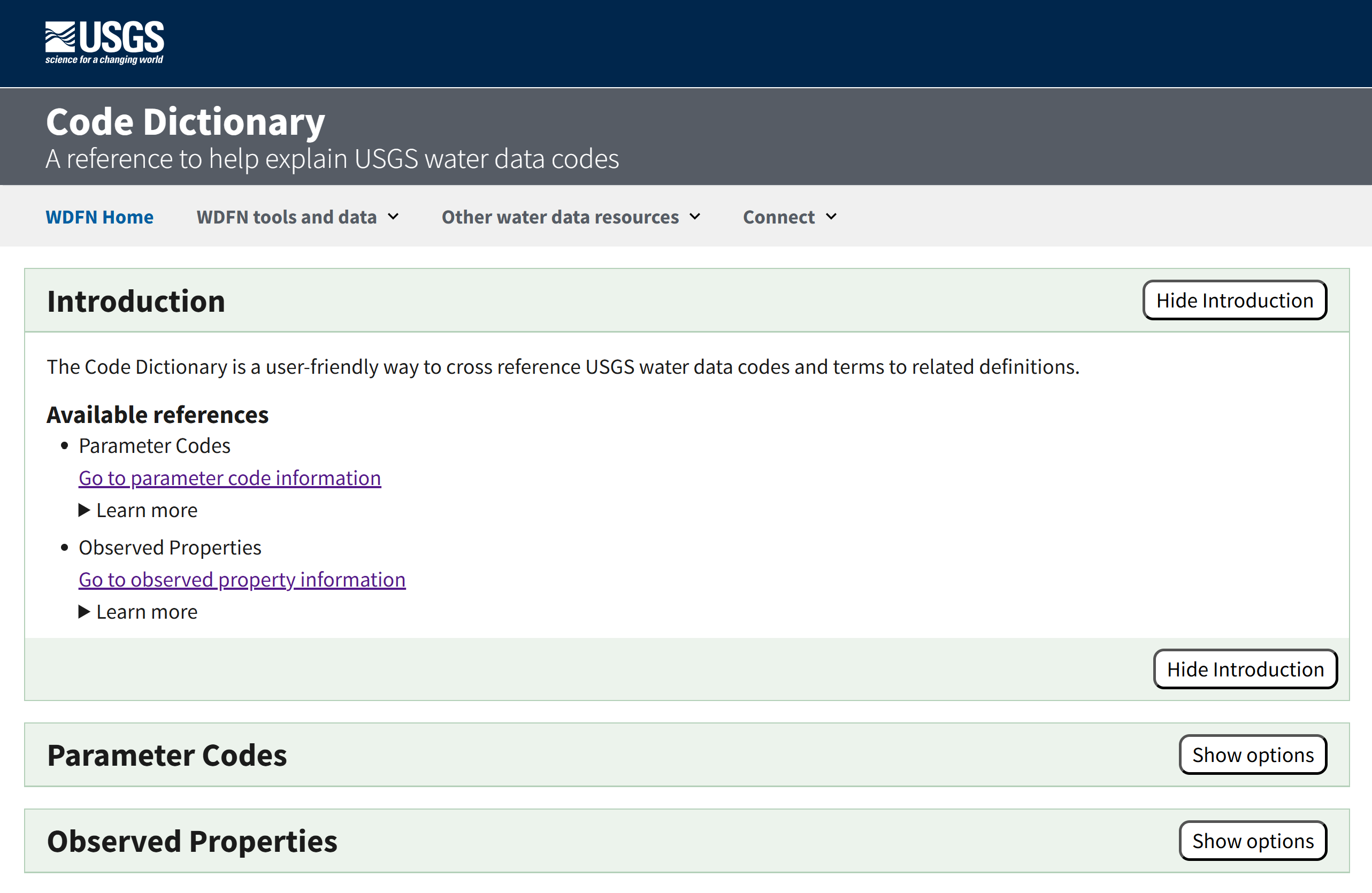
The Code Dictionary provides an easy way to explore parameters and observed properties that describe USGS water data.
In the “Parameter Codes” section you can search by a parameter code, find a parameter code based on keywords, and download all possible parameter codes, with available output formats of csv, html, and json.
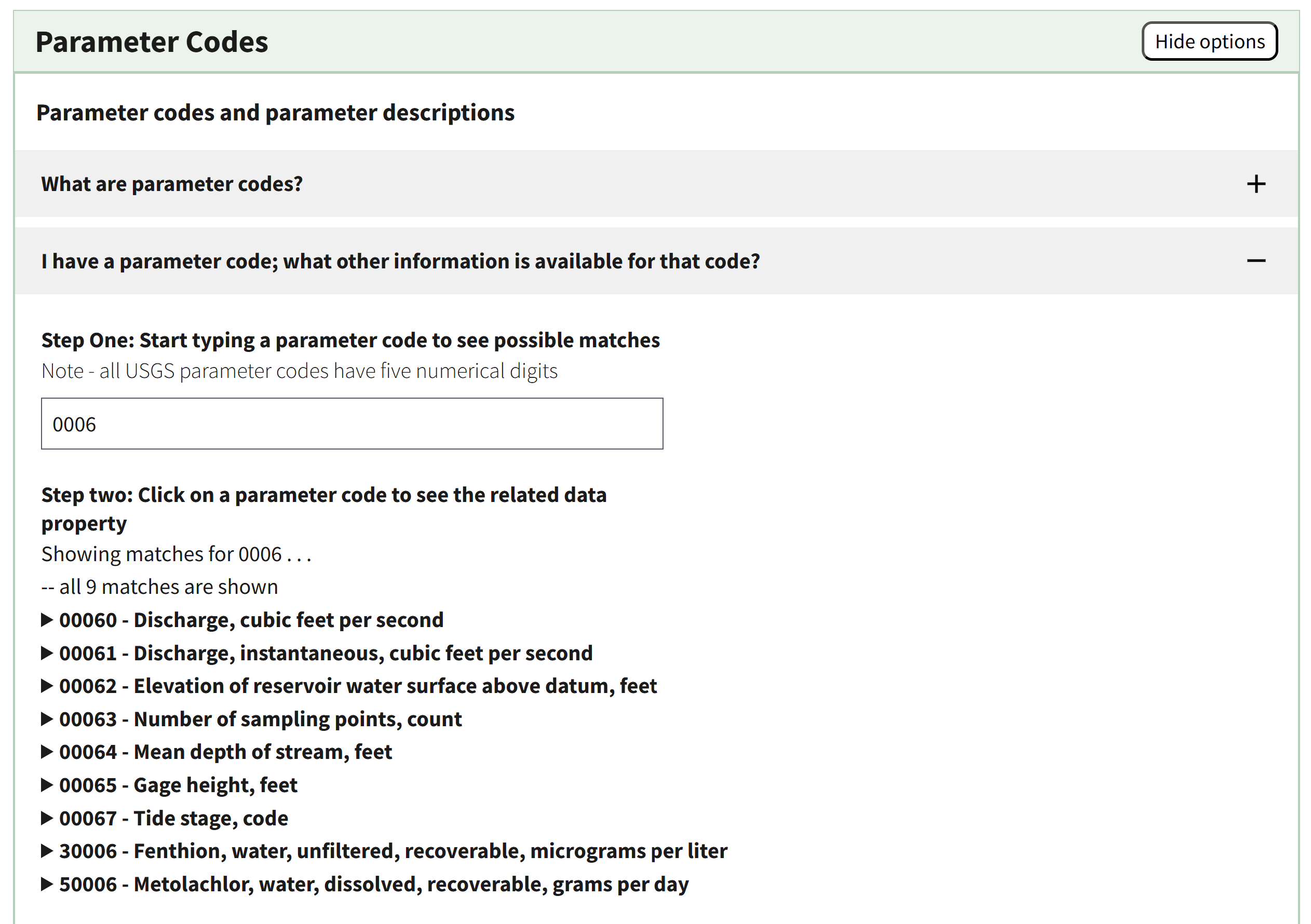
The Parameter Codes section supports searching between parameter code (pcode) and keywords in the parameter description.
In the “Observed Properties” section you can learn more about the relationship between observed properties and parameter codes, cross-reference parameter codes to observed properties and vice versa, and download all possible observed properties, with available output formats of csv, html, and json.
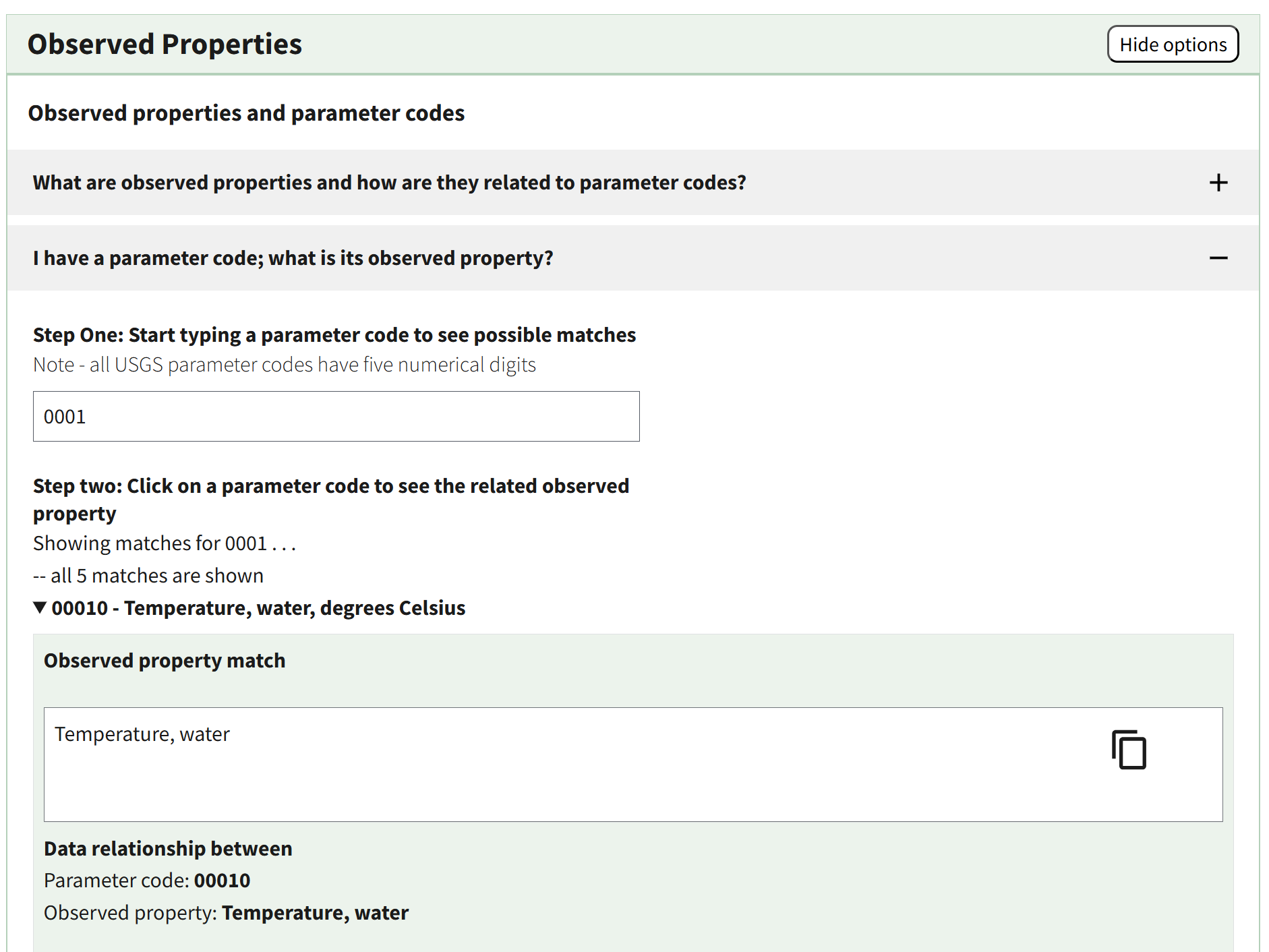
The “Observed Properties” section supports the cross-reference between parameter codes and observed properties.
Other USGS Water Data Metadata
Additional resources that describe USGS water data metadata are also available. These metadata collections support data access through the modernized APIs and downloads from WDFN pages. Below the list of “Data collections in this service,” you will find “Metadata collections in this service.” These collections are the definitive source of metadata definitions for USGS water data. They contain all the codes and abbreviations you might need to understand and use USGS water data. It includes metadata such as aquifer codes, agency codes, and site types.
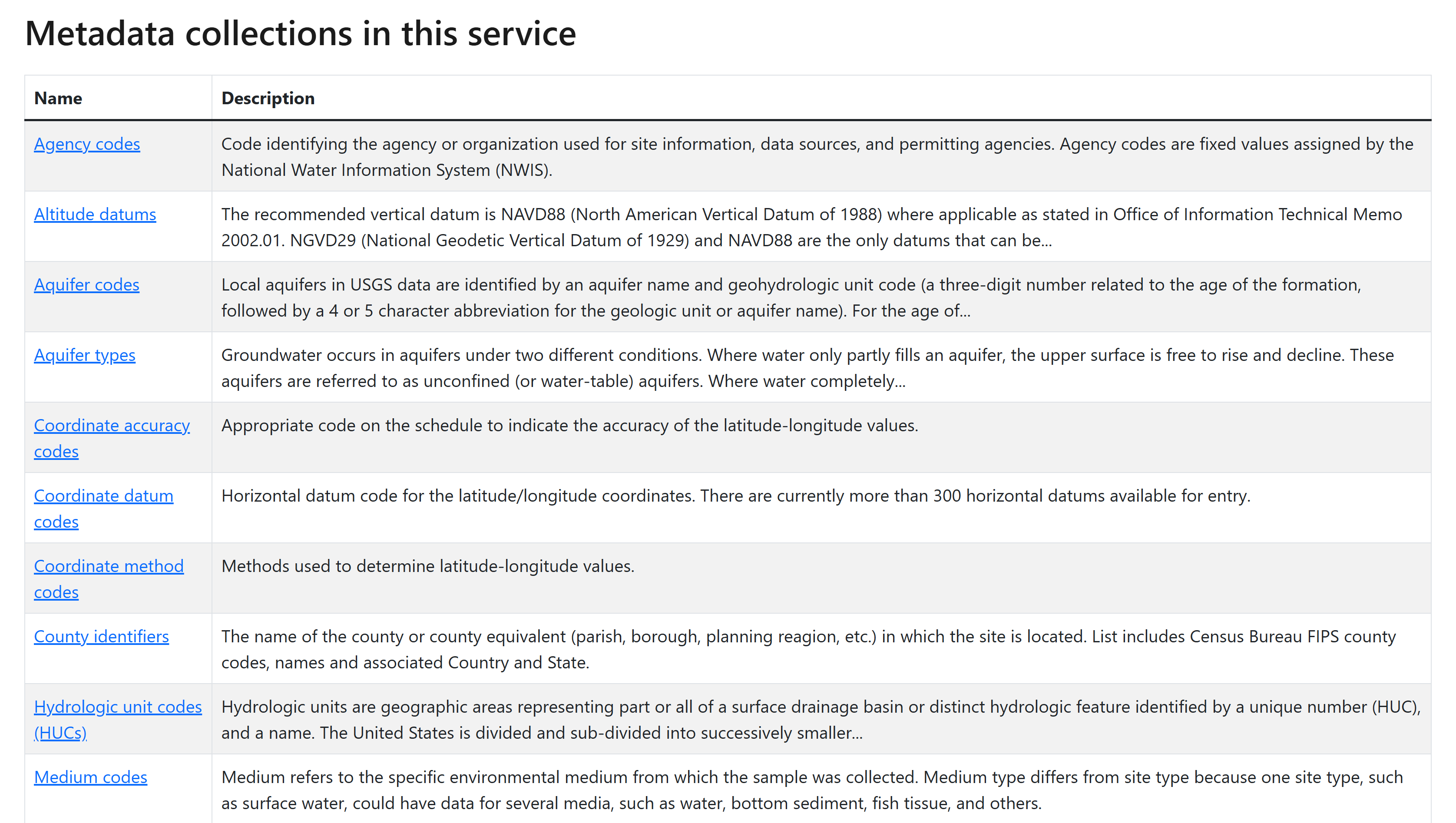
Metadata collections on Water Data APIs offer reference lists for additional metadata codes you may find in USGS water data.
After clicking on the metadata collection name, you can “browse the data” to scroll through a table of the codes and their descriptions.
Another tool that may be useful to you is the Hydrologic Units of the United States . Here you can learn about what hydrologic units are, the history of their use, and how to identify hydrologic units that are of interest to you. Additionally, all USGS monitoring locations have included in their location metadata the subbasin hydrologic unit in which they are located in—you can find this information in the “Location details and information” section towards the bottom of each monitoring location page.
Decommission of NWIS: Help System
The legacy NWIS: Help System at https://help.waterdata.usgs.gov
has provided information about NWISWeb and USGS water data for many years. Unfortunately, much of the content has become increasingly out of date as our modernization of data delivery has progressed. We have removed much of the out-of-date content already, and the remaining pages will be decommissioned as part of Decommission Campaign 2
. The legacy help.waterdata.usgs.gov URLs will be redirected to this blog post to help you find the metadata you were looking for on new WDFN webpages. Users looking for information about what data are available in WDFN should read USGS Water data collection categories
. We also have updated information about citing USGS water data
.
There may be additional questions or resources, other than metadata, that you are accustomed to visiting help.waterdata.usgs.gov for an answer. gs-w_waterdata_support@usgs.gov or submit a question or comment from any WDFN page for any support you may need as you begin to explore the new offerings in WDFN and USGS Water Data APIs.
We are here to help
We understand that change is hard, and some of these changes might feel sudden. We’re here to help. We have staff ready to help you make the transition to using WDFN webpages should you need it. Please reach out to us at gs-w_waterdata_support@usgs.gov with any questions. You can get regular updates about the modernization and decommission effort sent to your inbox by subscribing to the Water Data for the Nation newsletter .
The WDFN websites and services advance the way we deliver water data, and we are focused on continual improvement. Our team uses user-centered design processes to determine what to prioritize next. Let us know how the WDFN pages are working for you by emailing gs-w_waterdata_support@usgs.gov .
Related Posts
Decommissioning Legacy gwlevels and SensorThings APIs – Fall 2025
September 23, 2025
Background
For over 15 years, the USGS has provided machine-readable and automated access to water data via the WaterServices family of application programming interfaces (APIs), which are hosted at https://waterservices.usgs.gov/ . These APIs underpin all other USGS web delivery products – including products such as the National Water Dashboard and Water Data for the Nation (WDFN) – and have been incredibly effective at delivering water data to the public. Between October 2024 and March 2025 alone, these legacy APIs have handled more than 1.6 billion requests from almost 3.5 million distinct IP addresses.
Daily data in Water Data for the Nation
November 21, 2025
There have been a lot of changes to how you access USGS water data as we work to modernize data delivery in WDFN and decommission NWISWeb. As we centralize and re-organize data delivery in WDFN, we have recently set out to describe different types of water data according to data collection categories . We started with re-organizing and expanding the data collection categories that are delivered on the Monitoring Location Page and are now working to deliver additional data collection categories on other WDFN pages as well. This blog is part of a series to help orient you to where you can find different types of data in WDFN pages and services. In this post, we want to focus on how you can access daily data in WDFN.
NWISWeb Decommission Campaign 2
November 21, 2025
This blog will share information on NWISWeb Decommission Campaign 2, the second in a set of three campaigns to decommission legacy NWISWeb pages currently hosted at https://waterdata.usgs.gov . Campaign 2 is expected to be ongoing from November 2025 through February 2026.
New Feature - Field Measurements
September 23, 2025
We are excited to announce a new feature on Monitoring Location pages that provide field measurements, which are physically measured values collected during a field visit to a monitoring location.
Modernization of Statistical Delivery and WaterWatch Decommission
June 10, 2025
USGS is modernizing how statistical information is delivered through a suite of new features and products. These are replacing WaterWatch , which offered unique statistics delivery that differentiated it from the core data delivery through legacy NWISWeb. WaterWatch and Water Quality Watch are set to be decommissioned by the end of 2025 as new products become available. This blog details where you can find the statistics previously offered on WaterWatch.